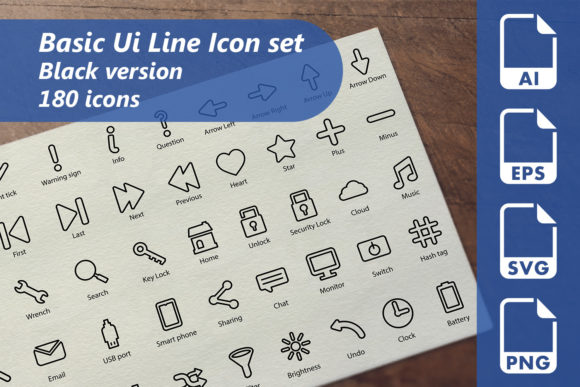
Explore Creativity with 180 Basic UI Line Icons
Basic UI Line is a meticulously designed collection of 180 icons, perfect for a wide range of design projects. Whether you're crafting a website, creating printed materials, or developing presentations, these icons offer a versatile and elegant solution. Each icon is crafted with precision, ensuring clarity and simplicity, making them ideal for both professional and personal use.
What Makes Basic UI Line Special?
The Basic UI Line icons are not just visually appealing; they are also highly functional. Here’s what sets them apart:
- Fully Editable Vector AI Files: Customize the icons to fit your specific needs. Resize, recolor, and modify them without losing quality.
- EPS File (Eps10 Version): Compatible with a wide range of graphic design software, ensuring seamless integration into your workflow.
- SVG Files (128×128 pixels): Perfect for web and digital projects, these scalable vector graphics ensure crisp, clear icons at any size.
- Transparent PNGs (256×256 pixels): Ideal for high-resolution displays, these PNGs can be used in various contexts, from websites to print materials.
Creative Possibilities with Basic UI Line
The versatility of Basic UI Line opens up a world of creative possibilities. Here are some ways you can use these icons:
Website Design
Incorporate these icons into your website's navigation, buttons, and infographics. The clean, minimalist style enhances user experience by providing clear, intuitive visual cues. For example, use a shopping cart icon for e-commerce sites or a magnifying glass for search functionality.
Printed Materials
Enhance your brochures, flyers, and business cards with these icons. The black color and simple lines make them suitable for both formal and casual designs. Consider using a calendar icon for event schedules or a location pin for maps and directions.
Presentation Graphics
Add a professional touch to your presentations with Basic UI Line icons. Use them to highlight key points, create timelines, or illustrate processes. A play button icon can signify video content, while a lightbulb can represent ideas and innovation.
Promotional Materials
From social media posts to email newsletters, these icons can help you convey your message effectively. Use a share icon to encourage engagement or a heart icon to express appreciation. The simplicity of the icons makes them easily recognizable and impactful.
Adapting Basic UI Line for Different Goals
Whether you’re a designer, marketer, or entrepreneur, Basic UI Line can be adapted to meet your specific goals and audience needs.
For Designers
Utilize the fully editable vector files to create custom designs. Experiment with different colors, sizes, and compositions to align with your project’s aesthetic. The SVG and EPS formats allow for seamless integration into design software, making it easy to incorporate these icons into your work.
For Marketers
Use the icons to create engaging and visually appealing marketing materials. Incorporate them into your branding, such as logos, banners, and promotional graphics. The consistent and clean design helps maintain a professional and cohesive look across all your marketing efforts.
For Entrepreneurs
Enhance your startup’s online presence with these icons. Use them to create a user-friendly website, informative blog posts, and engaging social media content. The simplicity of the icons ensures that your message is clear and easy to understand, helping to build trust and credibility with your audience.
Practical Tips for Using Basic UI Line
To get the most out of Basic UI Line, consider the following tips:
- Consistency: Use the same style and color scheme across all your designs to maintain a cohesive and professional look.
- Clarity: Choose icons that clearly represent their intended function. Avoid using overly complex or ambiguous icons that might confuse your audience.
- Customization: Don’t be afraid to customize the icons to better fit your project. Adjust the colors, add shadows, or combine multiple icons to create unique designs.
- User-Friendly: Ensure that the icons are easily recognizable and intuitive. Test them with your target audience to make sure they are understood and effective.
Inspiration and Ideas
Here are a few project ideas to inspire your creativity:
- Infographic Design: Create an infographic that uses Basic UI Line icons to explain a process or present data. The clean, simple icons will help make the information more digestible and visually appealing.
- Interactive Presentations: Develop an interactive presentation where users can click on icons to reveal more information. This can be particularly useful for educational or training materials.
- Mobile App Design: Integrate the icons into your mobile app’s interface. Use them for navigation, settings, and other interactive elements. The consistent and clean design will enhance the user experience.
- Branding Collateral: Incorporate the icons into your company’s branding collateral, such as business cards, letterheads, and email signatures. The simple and elegant design will help reinforce your brand identity.
With Basic UI Line, the possibilities are endless. Whether you’re looking to enhance your website, create engaging presentations, or develop eye-catching promotional materials, these icons provide a versatile and elegant solution. Embrace the creativity and practicality they offer, and watch your projects come to life.